
It was born as a simple search aggregator to get results much faster and has become a powerful AI tool that will not only allow you to replace Google in your daily life but will also surpass ChatGPT in many of its current uses.
In this Perplexity AI tutorial, you will learn how to use the tool by exploring its basic and advanced features and how to take advantage of its premium features.
What is Perplexity AI? – The Search Engine with Artificial Intelligence
Perplexity AI is a generative artificial intelligence tool that works as an AI search engine and chatbot.
Thanks to its natural language processing (NLP) and machine learning technology, it can generate responses to user queries. Designed to understand and generate text efficiently, it performs internet searches and writes direct, relevant answers based on various sources.
While traditional search engines like Google offer a list of links to web pages as a result, Perplexity AI generates a direct answer backed by a reliable set of sources (magazines, articles, Wikipedia…).
In addition, it searches in real time and provides up-to-date information on each topic. It can explain concepts, translate texts, plan activities, and much more. Discover a new way to search for information on the Internet with Perplexity AI: natural language compression, direct, up-to-date answers, and conversational interaction.
Perplexity Tutorial – Getting Started
Create an Account
Although creating a premium account is not mandatory, you must register on the platform to use Perplexity.
It is very simple: once you are on the website, go to the left sidebar and click the register button. There, you can either use an account such as Google or create one from scratch.
Its aim is that when you have a query, you no longer go to Google but instead ask the tool the question as you would ask another person, in natural language, not so much based on keyword coincidence as in traditional search engines.
Seeker
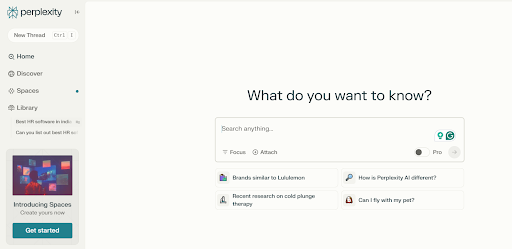
The first thing we see when we open the tool is Perplexity, waiting for us with the headline “Where knowledge begins,” a clear declaration of intent.
- Perplexity’s primary function is to be an advanced Internet search engine. It goes a step further by capturing the context of the search, understanding the nuances of language, and can deliver more accurate results.
- Perplexity searches different websites, online studies, articles, etc. for you, grouping the responses in such a way that you access curated information, saving you a lot of time every day.
- It also shows you the sources used to create the information, which is very useful for verifying the data’s veracity.
Perplexity AI and Its Advanced Functionalities
Information Search and Focus
In the Perplexity search box, we find the ” Focus ” option. This is where you can start taking advantage of this tool, filtering how you want to access the information.
This allows you to perform very precise and specific searches on specific topics, much more quickly than you would on any other platform.
Let’s see what types of searches we can perform:
Natural Search
You will be able to make queries in natural language as if you were talking to a person. You can ask complex questions and get detailed answers.
Search in Sources
Perplexity can search for information from a wide variety of sources, including web pages, academic articles, news, Reddit, YouTube, and more.
And the most interesting thing of all is that you can ask him to focus on one of these areas in particular.
Imagine, for example, that you want to write a scientific text on a specific topic in nature. Instead of searching for information on Google, you can ask him to consult academic studies, which he will then give you the source for.
Filter the Results
One feature many people are unaware of is that Perplexity lets you add filters to make your response more specific.
For example, you can ask it to show only content published on a specific date or by a specific nationality, so the response is much more precise. As you can see, this tool’s main purpose is to provide you with a specific answer to your searches quickly and easily.
Choose the Format
Unlike other tools, Perplexity accesses a wide range of content sources, not just text. When you perform any search, you can ask it how you want to receive the information.
Do you prefer text? Are you looking for image content? Do you want her to check out videos on YouTube? You call the shots, and she’ll do the searching. And if you don’t add anything, she’ll simply compile what she considers most interesting across different formats.
The Discovery Screen
One of the most interesting tabs on this platform, especially if your searches tend to be limited to a specific set of topics, is the “Discover ” tab, located in the left sidebar.
As you use the tool, Perplexity learns about you. And without you having to ask, it will accumulate news and new content that it thinks might be interesting.
It’s a great way to stay up to date and access new ideas. Plus, all the sources that come up in any search will also appear here, so you’ll have a history in case you ever want to look up that interesting news story that you forgot about.
Perplexity AI PRO Features Guide
- Copilot: This gives you an assistant who accompanies you as you use the tool. It will not leave you alone with your searches but will ask you questions and requests to ensure that you find the right answer and that it can offer you better information and consult the appropriate sources to do so. The difference between the answers with Copilot and without it… is very large.
- Citations and sources: In its free version, Perplexity also tells you where it is extracting the information from, but with the premium feature, it goes one step further: it formats the citations professionally so you can use them directly in any work where this is required. What’s more, it will allow you to ask it to be cited in different styles so it adapts to what the recipient expects.
- Integrations: The PRO version allows you to integrate with productivity tools such as Drive or Dropbox, so it can use the information you store there to guide its searches and export the results in formats most useful to you, such as CSV or JSON.
Add SocialAtoZ as a preferred source
See us more often in your Google results.