One of the most recurring questions, which usually generates many doubts, is how to use Instagram hashtags. If you work this social network within the marketing strategy of your brand, you will have already realized the importance that these have for your publications to achieve greater organic reach and attract more people interested in your content.
So that all your doubts about these labels are in vogue are dispelled, today I am going to explain everything about these great allies so that you can learn to get the most out of them with strategy. Go for it!
What are Instagram Hashtags and How Do They Work?
A hashtag is a word or a phrase made up of letters and numbers (you cannot add special characters) that, without any space between them and preceded by the hash symbol (#), becomes a label used to group content from the same topic on social networks.
When you click on a hashtag, you see all the posts from different people with public accounts who have also used it in their content.
On Instagram, it is very common to search for specific tags for topics that interest us or are related to our topic, and even to follow them, as when you follow a person or account that interests you.
Structure of an Instagram Hashtag
Now that you know what a hashtag is, we are going to see its structure in this specific social network:
What are Instagram Hashtags used for?
As we have already seen, the main utility of this tag is to group content by theme so that people can locate it easily.
But we can also find other benefits for this network.
Benefits of Using Instagram Hashtags
- Increase the reach of your publications.
- Get more visibility for your profile and content.
- Reach new audiences.
- Get more “likes” on your posts.
- Connect with potential customers.
- Position your brand.
- Keep you informed of the news on a specific topic.
- Discover the competition.
- Support causes or events.
In short, hashtags are one of the most effective ways to grow your community and make yourself known on Instagram.
How Many Hashtags Can You Put On Instagram?
Here comes “the million dollar question”: one of the most controversial questions, and for many, choosing hashtags for their publications is a headache. The first thing is to know what the official channel of the Instagram application itself says about it.
As you can see, this social network allows you to use up to 30 hashtags in each publication. This does not mean that, in each publication, you have to use 30 to reach the maximum number, or, conversely, use very few because you do not know which hashtags to use.
The important thing is to use tags that are relevant and consistent with the content you are sharing and the objective of your publication. Each publication you make is different, and it is clear that using tags unrelated to your publication’s theme and content won’t help you.
Therefore, it is not a matter of using them at random, but of choosing the most recommended ones for your publications. For this, you need to develop a strategy and test to see what works best for you.
Before giving you some tips to prepare your strategy, let’s see where you can use them.
Where Can You Put Instagram Hashtags?
You can place labels in 5 different sections of your account:
Profile Bio
This small section of 150 characters allows you to enter hashtags, although it is not recommended that you use them unless you have one of your own brand or business. Remember that you can click these tags and leave your profile to see other content that uses those tags.
Therefore, if someone has just landed on your account and the first thing they see is an invitation to leave for another place, they will not have had time to get to know you a little better or to see options to follow or interact with you.
In the event that you include a hashtag of your own brand in your bio, by clicking on it, that person will continue to see content of your own brand or in which your products or services have been tagged.
In the profile biography, with the brand tags, you create a loop of content related to your brand.
Publications
Placing the hashtags after the text accompanying the image is the most common practice. Since you have up to 2,200 characters and will surely have plenty, you can separate the block of labels you use from the text to make it more visually appealing.
Comment
Another place people often put them is in the first comment that accompanies the post. The application also offers this option, provided you do not exceed the limit we discussed in the previous section.
Stories
Among all the options that stories allow you, one of them is hashtags. The maximum limit is 10; from there, you choose how many to put.
You have to know that since 2021, with the changes to the algorithm, they no longer position. We will see if this changes again later. The option is there.
Reels
Reels are the trending format on Instagram and can appear in the “Explorer” tab or when someone searches for or clicks on a hashtag, so it is advisable to add tags to these videos.
How to Know What Hashtags to Use on Instagram?
First of all, I have to clarify that there is no perfect hashtag or combination of hashtags that you can always use in your posts.
If you want your content to stand out, you have to spend time researching which ones are most appropriate and work best for your niche, sector, and objectives. Partnering with top social media marketing agencies can help streamline this process, providing expert guidance on strategy, content selection, and audience engagement to maximize impact.
Types of Hashtags that you can use on Instagram
Let’s start by knowing what classification we can perform to determine which label we are most interested in using.
They can be classified into many categories. Some of them are:
Branded
It is the one that a brand or company uses to tag its content on Instagram. The most common is to use the name of the company, for example, #socialatoz or the name of a product or service, for example, #Mastersocialatoz
Community
They are those that serve to identify the community of a brand, for example, #MangoCommunity or community accounts that share their photos and/or experiences of the same theme, such as the Igers community or photography communities, asi_es_family, or total_community_hubs
Campaign
They are used to promote a campaign for a product or service for as long as it lasts. Once finished, it is no longer used. Some examples of this type are: #BlackFriday #limpiolimpiosinenjagar
From Location
They are those that refer to your country, your city, the area where your physical store is located, or the location where you are at the moment in the photo you want to highlight.
From Your Sector
They are labels related to what you do, offer, or sell. In the marketing sector, an example is #digitalmarketing
Of Content
They are relevant keywords related to the content or theme that you are going to publish. #Instagramtips is an example of this type of tag within the Marketing sector
From Your Ideal Client
They are those related to your buyer persona or ideal client, that you know they usually use and look for. If your buyer persona is an #entrepreneur, you already have one that could help you.
Popular
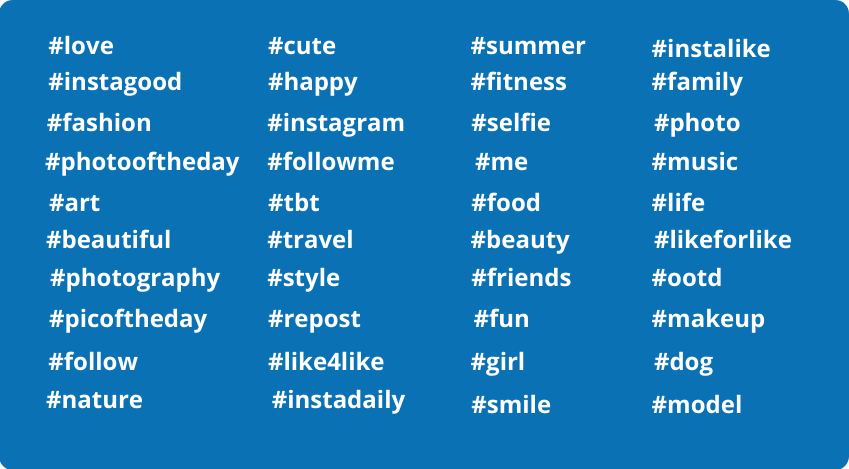
As you can imagine, they are the most used on Instagram. His position on the list changes with social network trends and over time.
Here are some of the most popular hashtags so far:
Tips for Developing a Good Instagram Hashtag Strategy
Define Your Objective and Keywords
Write down what your objective is and investigate which keywords are important to your brand.
Looking at the tags your competition uses can help you get ideas and even improve your own. It is not about copying but about analyzing and discovering hashtags from your sector that you were unaware of.
This will help you when you start looking for the most appropriate tags for your account.
Create a List of Instagram Hashtags by Categories
Create a list with the categories of hashtags that interest you and are related to your sector, product or service, topic, and client.
I advise you to do it better in a spreadsheet such as Excel and to classify them by category and publication volume to see how many times that label is used.
This way, you will start from a base and will not have to waste as much time each time you publish. You can add new ones as you need them.
Vary the Hashtags
Do not always use the same hashtags in your posts. Make an extensive list of at least 90 that you would use in three different publications. This way, you will have enough to make different combinations without always repeating the same ones, and more opportunities to be found through other labels.
The normal thing is that the content of your publications varies in terms of copy, images, or videos you use; therefore, your hashtags will have to be related to that specific content.
The algorithm will not penalize you for repeating any of them in your publications, but if you always use the same ones, it can penalize you by narrowing the scope of your publication for failing to find a correlation between the image and the label.
Don’t Use Too Many Generic or Widely Used Hashtags
Use more specific, less general hashtags to segment more effectively and reach a more targeted audience interested in your posts.
Think that the more it is used, the less likely it is to draw attention to your publication. These types of tags cause your content to drop early and rank below other, newer content that uses them.
I recommend you use the medium or medium-large sizes (between 10,000 and 200,000 publications). You can get help from the application search engine. In it, you can see how many times that particular tag has been used.
Do Not Forget the Most Important Thing: Analyze the Results
This will allow you to see the impressions your hashtags generate for your publication and whether the number of new audience members you have reached has increased.
How to Know If a Hashtag is Penalized?
There are two types of penalized hashtags that you should not use in your posts:
Hashtag is Permanently Disabled or Banned
They are those words that violate Instagram policies, such as words with sexual connotations, drugs or illegal products, alcohol, and violence.
Hashtags Temporarily Disabled
They are those posts that the Instagram community has reported as including them, and that the network believes could violate the community guidelines.
If you use them, the algorithm will stop showing your posts (what is known as a shadowban), which you are not interested in because fewer people will see them, and interaction and engagement will drop.
In the following section on tools, I share some tools to help you verify that you are not using this type of tag. Even so, I always recommend checking it in your search engine.
Tools for Instagram Hashtags
Luckily, today there are many applications that help you manage your Instagram account professionally.
For this reason, I bring you some extra specific help so that your hashtag strategy is as top as possible:
Display Purpose
Display Purpose is a free, easy, and intuitive tool that allows you to search for labels with 3 search options:
- You can search for one or more related ones, and they are ordered by relevance and influence, with different colors indicating their influence. It allows you to copy and paste.
- You can search the map for the most used ones in the geographical area you want to consult.
- You can search for all related hashtags for a term, and they appear as a connected network, with colors indicating each tag’s relevance and influence.
All Hashtags
All Hashtag is a free tool that allows you to generate, create, and analyze hashtags for the content of your social networks:
- With the Generator, you will be able to copy and paste up to 30 tags based on a keyword. You have three search options (Top, Random, or Random and Live or Lived).
- With Creator, you can transform the keywords you enter into tags ready to cut and paste into your publications.
- With Counter, you can enter text, and it will count the number of hashtags in it.
- With Analytics, you analyze and compare a tag’s popularity against other general tags.
Inflated
On this website, you will find a hashtag generator for Instagram in its tools that allows you to search by keyword, photo, or URL.
Once you click generate hashtags, the search results are divided into three columns: frequent (frequent), average (average), and rare (uncommon).
You can copy and paste up to 30 labels, either by column or one at a time, as you think best for your strategy.
You can also click on any tag for which you want to know the level of difficulty that the tool estimates for that tag, the number of posts using it per day, and the total volume of posts for that tag.
Instavast Free Tools
Instavast is a cloud-based automation tool that uses Instagram Banned Hashtags to let you know which tags are banned on the social network.
It provides you with an alphabetical list and a search engine where you can enter the label you want to consult.
It is not a very reliable tool, as it is not updated frequently. My recommendation is that when in doubt, use its search engine to ensure this label complies with the community standards.
Metricool
Metricool is a great tool for analyzing, managing, and measuring digital content.
Among its many features, it allows you to:
- Analyze the hashtags that have worked best for you. It shows you a list of the ones you have used in your publications, along with the impressions for each hashtag by publication.
- In the calendar section, when creating a new publication, use the tag search engine to find the most popular and those related to a specific keyword.
- It lets you see which ones your competitors use most in their publications, so you can analyze whether they are interesting for your strategy.
Conclusion
Now that you know how they work and their benefits, you have all the tips I have to develop a good hashtag strategy for Instagram.
I hope you follow the steps I have given you to develop your own strategy, make your account visible, and grow your community with quality.
Add SocialAtoZ as a preferred source
See us more often in your Google results.