In our daily lives, instant messaging, social networks, and email apps have become integral parts of our routines, enabling us to seamlessly carry out a multitude of tasks. The significance of these three elements cannot be overstated.
As our reliance on social networking and instant messaging applications has surged, the prospect of losing access to our online accounts has become a source of significant distress. Snapchat, a widely-used photo-sharing platform, has entrenched itself as a unique avenue for communication, resonating with users who seek both amusement and connectivity with their loved ones.
Catering to both adolescents and adults seeking engaging messaging and video-calling experiences, Snapchat has evolved over time, now offering an array of features designed to fortify account security against hacking attempts. Nonetheless, despite these protective measures, situations can arise where regaining access to one’s account becomes a pressing concern.
How to Easily Recover a Snapchat Account?
Are you in a situation where you need to recover your Snapchat account? Rest assured, the process is straightforward once you’re armed with the right knowledge. Below, we present uncomplicated methods to help you regain access to your Snapchat account. Let’s dive in.
Regain Access When You Forget Your Password
If your Snapchat password has slipped your mind, regaining entry to your account is entirely feasible. Snapchat provides a pathway for account recovery in such instances. Follow these steps to proceed:
- Launch the Snapchat application on your Android smartphone.
- Locate and tap the Login button at the bottom of your screen.

- On the login screen, tap the option labeled “Forgot your password?”
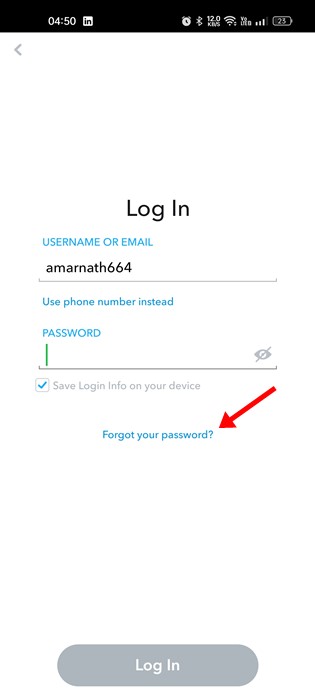
- At this point, a prompt will appear, offering you the choice to initiate Snapchat account recovery through either your phone number or email address.
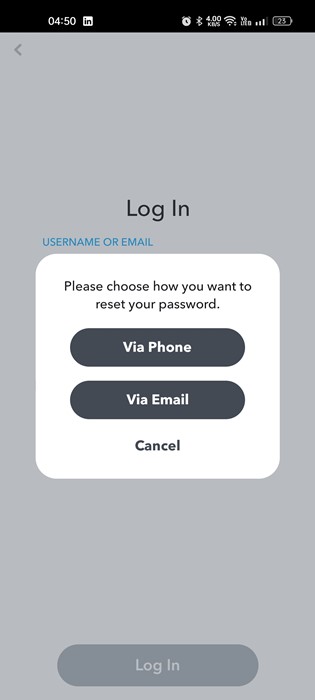
- Opting for the ‘Via Phone’ route will lead you to input your phone number as prompted.
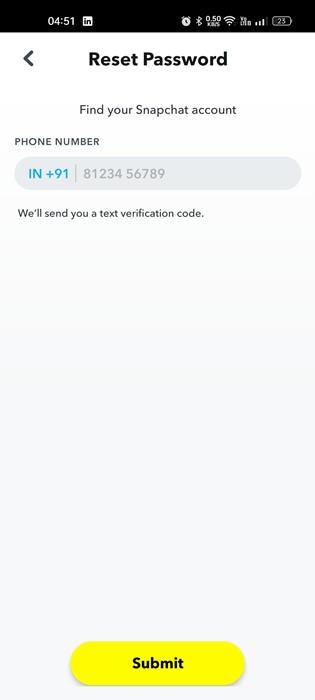
- Subsequently, the application will prompt you to choose between receiving a call and a message. Make your choice accordingly.
- Following your decision, an OTP will be sent to your registered number. Input this code to proceed with the password reset.
- Opting for the ‘Via Email’ alternative involves providing the email address linked to your Snapchat account. Following this, click the Submit button to move forward.
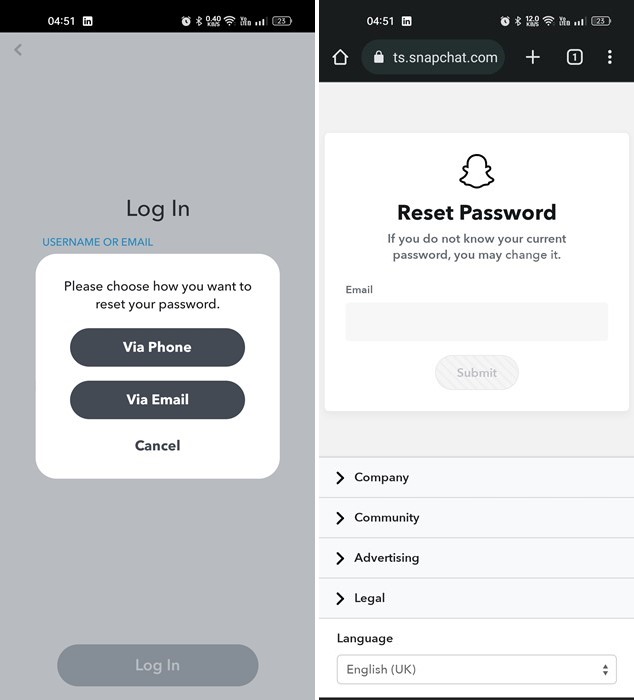
- Snapchat will send you an email with a link to reset your account password. Simply follow this link to initiate the password reset procedure.
Recovering Your Snapchat Account When You Forget Your Username/Email
If you’ve forgotten your Snapchat password, the method outlined above can help you reset it quickly.
However, if your predicament involves being unable to access or recall your registered email address, you have a few potential avenues to explore:
Utilize your phone number for password reset: Beneath the Username or Email field, an alternative option is available that prompts you to ‘Use phone number’ instead.
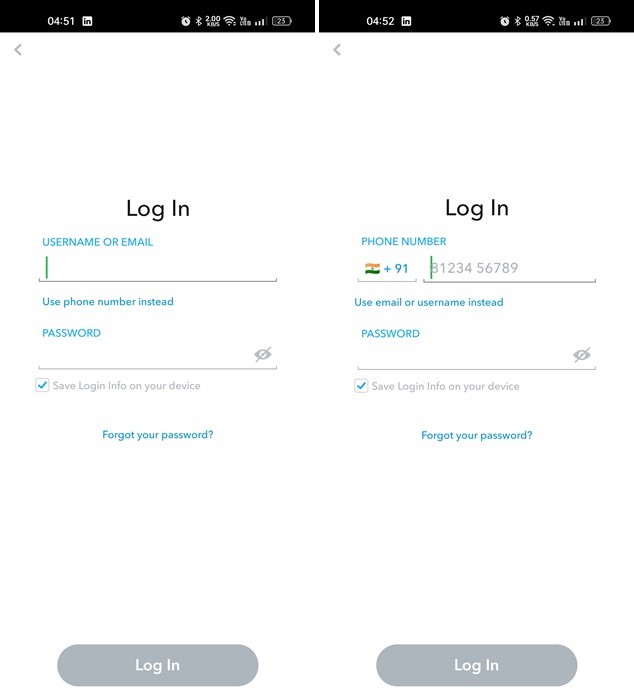
If your phone number is registered, you can access your account without an email. This method allows you to regain access to your Snapchat account even without an email address.
Getting in Touch with Snapchat Support: If you can’t recall your phone number or email address, reach out to the Snapchat Support team.
If neither your phone number nor your email is available, the only way to recover your Snapchat account is to contact Snapchat Support. To contact Snapchat support, follow the steps outlined below.
Recovering a Stolen or Hacked Snapchat Account
If your Snapchat account has been compromised, your options might be limited. The individual who gained unauthorized access may initially alter the username and password. In such a scenario, your best course of action is to reach out to Snapchat Support. You can complete the necessary form and hope that the support team will take appropriate measures based on your report.
Should the support team identify any unusual or suspicious activity associated with your account, they might request specific information to establish your ownership of the account. This could include details such as your username, device details, and other linked information.
Nevertheless, if you suspect someone may have unauthorized access to your Snapchat account, it’s crucial to promptly change your password and enable two-factor authentication for added security.
Securing Your Snapchat Account: Best Practices
To safeguard your Snapchat account, there are several proactive steps you can take. We’ve outlined key security measures that all Snapchat users should consider implementing:
Establish a Robust Password
A strong password serves as a vital defense against hacking attempts and brute force attacks. Crafting a potent password requires careful consideration: combine uppercase and lowercase letters, numbers, and special characters for optimal security. Using password manager applications can help generate and store these complex passwords. Alternatively, you can refer to a comprehensive guide on crafting highly resilient passwords for your online accounts.
Keep Email ID and Phone Number
Maintaining up-to-date email ID and phone number information is a fundamental security practice. If you’ve recently altered your phone number, ensure you promptly update this information within the Snapchat app. Consistently verifying and updating these contact details contributes to the integrity of your account’s security.
Utilizing Your Email Address and Phone Number for Snapchat Account Recovery
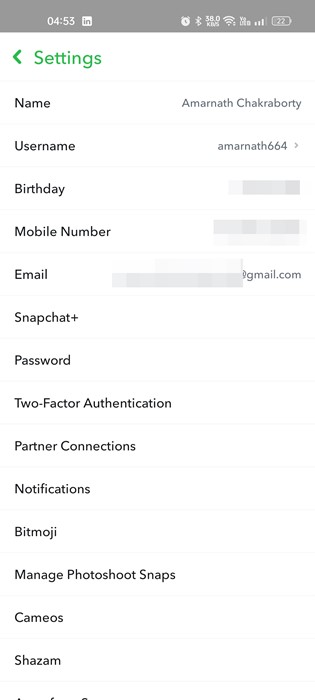
In the event of account recovery, your email address and the associated phone number play a crucial role. To ensure a smooth recovery process, follow these steps within the Snapchat App:
- Open the Snapchat App and Access Settings: Tap the Bitmoji icon to open the main menu, then tap “Settings”.
- Verify Email and Phone Information: In Settings, confirm that both your mobile number and email address are properly verified and linked to your account. This verification is essential for a secure and efficient account recovery process.
Enabling Two-Factor Authentication for Your Snapchat Account:
Adding an extra layer of security to your Snapchat account with two-factor authentication (2FA) helps keep it safe. Here’s how you can set up 2FA:
- Access Settings: Open the Snapchat app and tap on your Bitmoji icon to access the main menu. From there, go to “Settings.”
- Navigate to Security: Within the Settings, look for the “Security” section. This is where you’ll manage your account’s security settings.
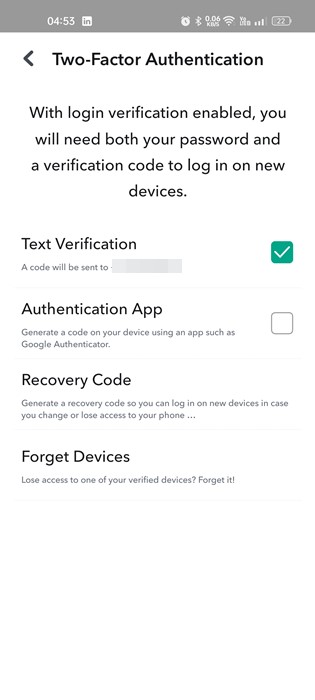
- Set Up Two-Factor Authentication: In the Security section, you should find an option for “Two-Factor Authentication.” Tap on this option to proceed.
- Choose Verification Method: Snapchat offers several 2FA options, such as text message (SMS) or an authentication app. Select your preferred method.
- SMS Verification: If you choose SMS, Snapchat will send a verification code to the phone number you linked. Input the code to confirm it’s really you.
- Authentication App: Opting for an authentication app like Google Authenticator or Authy involves scanning a QR code provided by Snapchat. This app generates time-based verification codes.
- Complete Setup: Follow the prompts to finish setting up 2FA. Snapchat may provide backup codes that you should save in a safe place. These codes can be used if you can’t access your verification method.
- Confirm Two-Factor Authentication: Once the setup is complete, Snapchat will prompt you to enter a verification code from your chosen method to confirm that 2FA is active.
With two-factor authentication enabled, logging into your Snapchat account will require not only your password but also the verification code from your chosen method, adding an extra layer of security to your account.
Add SocialAtoZ as a preferred source
See us more often in your Google results.